Why TgCore exists
Telegram APIs are powerful but messy. TgCore turns them into a clean, composable chain.
See TgCore API docs
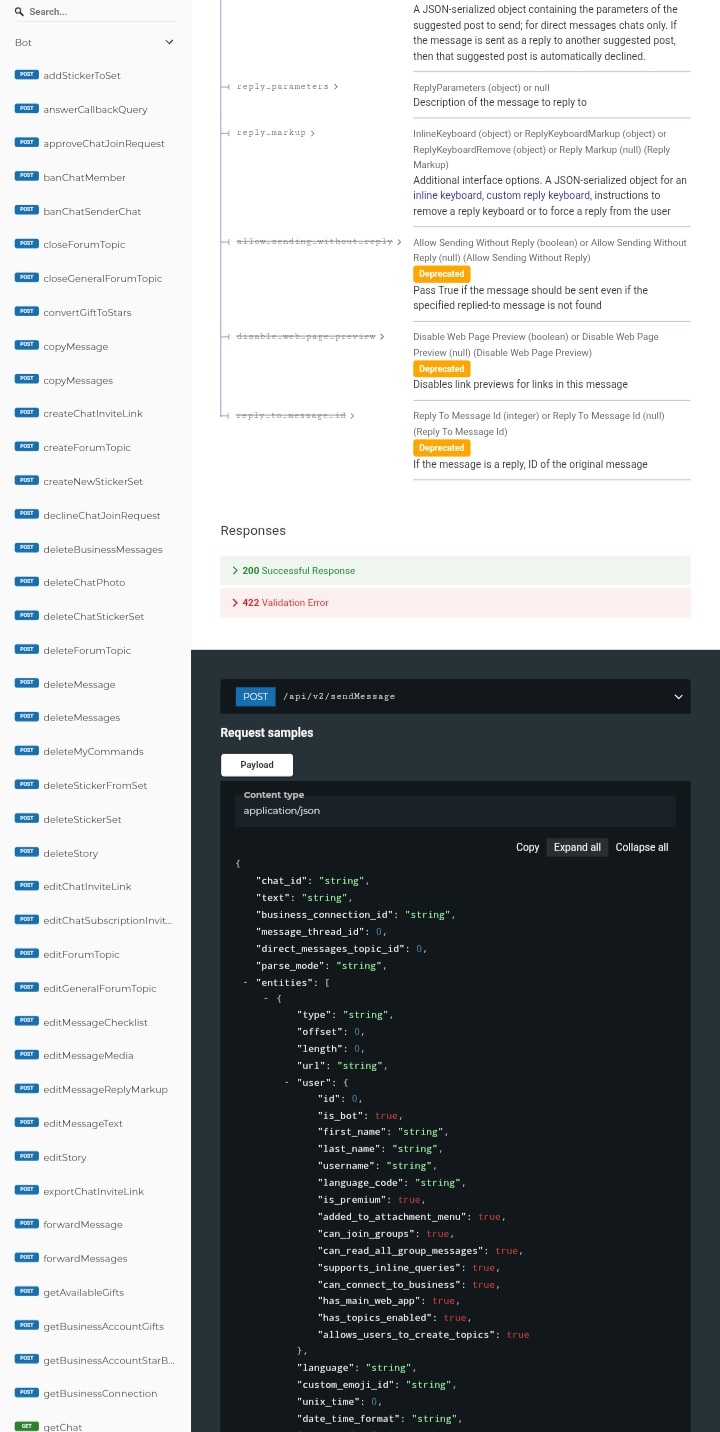
Raw APIs expose complexity. Good SDKs absorb it.
Why fluent builder?
Yes, having only a few parameters is nice. func(arg, arg)
But the Telegram API has a lot of parameters, so Fluent Builder allows optional parameters to avoid lengthy functions.
That’s why many modern SDKs use that pattern.
Traditional Telegram API calls often require many parameters.
This leads to what developers call “parameter hell”.

If your API needs too many parameters, your abstraction is missing.
send_message(
 chat_id,
 text,
 parse_mode,
 disable_notification,
 reply_markup,
 protect_content,
 ...
)

Instead of passing many parameters at once, TGCore uses a fluent builder interface.
tg.send().chat_id().text().send()
Telegram API
send_message(chat_id, text, parse_mode, disable_notification...)
TGCore
tg.send().chat_id().text().send()
Level architecture
TGCore is not just a library. It’s an SDK architecture.
Full documentation is available in the docs.
Without explanation, the architecture may look confusing. ⊙﹏⊙

Quick start example
TGCore is an asynchronous Telegram SDK framework for Python designed around a fluent builder architecture.
It eliminates parameter-heavy API calls and replaces them with a composable chain-based interface.
pip install tgcore
Create a client and send your first message:
from tgcore import Client

tg = Client(api_key="YOUR_API_KEY")

await tg.raw.sendMessage()\
    .chat_id(123456789)\
    .text("Hello from TGCore")\
    .send()
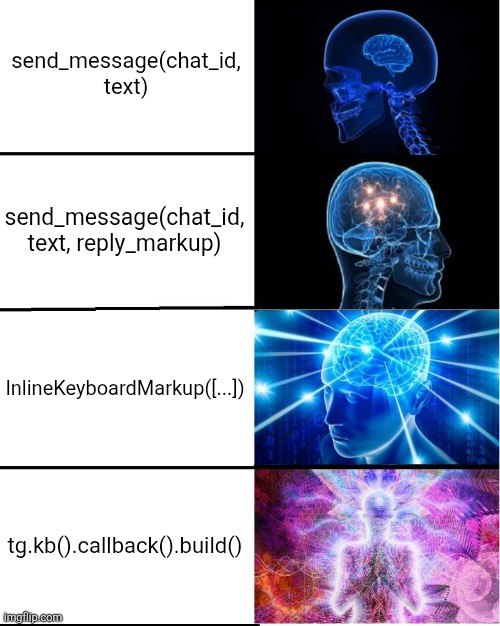
TGCore provides a keyboard builder that simplifies the construction of Telegram’s Core InlineKeyboardMarkup and Pyrogram InlineKeyboardMarkup.
An example of keyboard or reply markup will demonstrate the power of chaining:
kb = tg.kb().copy_text("Click", "ok").build() # version: 1.0.68

await tg.raw.sendMessage()\
    .chat_id(123456789)\
    .text("Hello")\
    .reply_markup(kb)\
    .send()
KeyboardBuilder
Build keyboard and send message in 2 lines.
kb = tg.kb().style("Custom Name", "danger", copy_text={"text": "ok"}).build() # version: 1.0.68
await tg.raw.sendMessage().chat_id(id).text("2 Lines real shit").reply_markup(kb).send()
# version: 1.0.68
kb = tg.kb()\
      .style("Custom Name", "danger", copy_text={"text": "ok"})\
      .build()

await tg.raw.sendMessage()\
    .chat_id(chat_id)\
    .text("2 Lines real shit")\
    .reply_markup(kb)\
    .send()
# version: 1.0.69
tg.kb.inline()
tg.kb.reply()

tg.msg
tg.getkwargs()

# version: 1.0.68
tg.kb = tg.kb()\
   .style("A", "success", copy_text={"text": "this copy"})\
   .style("B", "danger", copy_text={"text": "this danger"})\
   .row()\
   .style("Github", "primary", url="https://github.com/TeamKillerX/tgcore")\
   .style("TeamKillerX IO", "success", url="https://teamkillerx.github.io/tgcore/")\
   .row()\
   .style("TgCore API Docs", "success", url="https://tgcore.ryzenths.dpdns.org/api/v2/docs")\
   .row()\
   .style("Callback A", "primary", callback_data="#abc")\
   .style("Callback B", "danger", callback_data="#abc")\
   .build()
Games Chain Challenge
Write backend logic like a chain, not JSON
- Without an API key
- This chain demo
- You can eval using userbot
from tgcore import Client

tg = Client(api_key="pass")

await tg.use.default\
     .route("games", "chain")\
     .user(
         tg.where(
             name="Randy Architect",
             age="145",
             hobi="all"
         )
     )\
     .database(
         tg.where(
             mongodb=True,
             redis=True,
             sqlite=True
         )
     )\
     .pretty()
Output:
{
  "ok": true,
  "data": {
    "user": {
      "name": "Randy Architect",
      "age": "145",
      "hobi": "all"
    },
    "database": {
      "mongodb": true,
      "redis": true,
      "sqlite": true
    }
  }
}
payload DSL (domain-specific language)
JSON is the output, not the source of truth The architecture should absorb API changes
result = await tg.use.default\
      .route("gemini", "gemini-2.5-flash")\
      .contents(
          [
              tg.where(
                  parts=[tg.where(text="lu siapa keren?")]
              )
          ]
      )\
      .system_instruction(
          tg.where(
              parts=[tg.where(text="kamu adalah TgCore komedi lucu")]
          )
      )\
      .generationConfig(
          tg.where(
              temperature=1.0,
              topP=0.8,
              topK=10
          )
      )\
      .send()

return result.text(gemini=True)
List Methods
tg.api_keytg.base_url
tg._ensure_client().get(url, params, json, headers)
tg._ensure_client().post(url, params, json, headers)

tg._headers(extra={})
tg.set_header(key, value)
tg.to_obj(data)
tg.kb() # version: 1.0.68, KeyboardBuilder
tg.lw() # LinkPreviewBuilder
tg.rs() # ReplyParametersBuilder
tg.is_url(text)

tg.writer(prefix, cbytes, is_base64=False)

tg._post(
   path="/api/todo",
   payload={},
   headers={},
   is_content=False
)

tg._get(
   path="/api/todo",
   payload={},
   headers={},
   is_content=False
)

tg.fetch_post(path, **kw)
RequestCall
tg.use.default.types().step().execute()

tg.use.default.types().step().skip()

tg.use.default.types().step().send(allow_object=False, via_result=False)

tg.use.default.types().step().pretty()
All Methods Available
Full documentation is available in the docs.

# Chat / Member Management
# Operations related to members, admins, and chat permissions
tg.raw.approveChatJoinRequest()
tg.raw.declineChatJoinRequest()
tg.raw.banChatMember()
tg.raw.banChatSenderChat()
tg.raw.unbanChatMember()
tg.raw.unbanChatSenderChat()
tg.raw.restrictChatMember()
tg.raw.leaveChat()
tg.raw.getChat()
tg.raw.getChatAdministrators()
tg.raw.getChatMember()
tg.raw.setChatTitle()
tg.raw.setChatPermissions()

# Message Management
# Operations to send, edit, or delete messages
tg.raw.sendMessage()
tg.raw.sendPhoto()
tg.raw.sendPhotoUpload()
tg.raw.sendVideo()
tg.raw.sendVideoUpload()
tg.raw.sendVoice()
tg.raw.sendAnimation()
tg.raw.sendPoll()
tg.raw.sendChecklist()
tg.raw.sendMediaGroup()
tg.raw.sendChatAction()
tg.raw.sendMessageDraft()

tg.raw.editMessageText()
tg.raw.editMessageMedia()
tg.raw.editMessageReplyMarkup()
tg.raw.editMessageChecklist()

tg.raw.deleteMessage()
tg.raw.deleteMessages()
tg.raw.deleteBusinessMessages()

tg.raw.copyMessage()
tg.raw.copyMessages()
tg.raw.forwardMessage()
tg.raw.forwardMessages()

# Chat Settings
# Visual settings or chat configuration
tg.raw.setChatPhoto()
tg.raw.deleteChatPhoto()
tg.raw.pinChatMessage()
tg.raw.unpinChatMessage()
tg.raw.unpinAllChatMessages()

# Invite Links
# Invite link management
tg.raw.createChatInviteLink()
tg.raw.exportChatInviteLink()
tg.raw.revokeChatInviteLink()
tg.raw.editChatInviteLink()
tg.raw.editChatSubscriptionInviteLink()

# Bot Information
# Bot information or configuration
tg.raw.getMe()
tg.raw.deleteMyCommands()
tg.raw.getWebhookInfo()

# Files / Media
# Retrieving or uploading files
tg.raw.getFile()

# Stickers & Emoji
# Sticker set operations
tg.raw.addStickerToSet()
tg.raw.deleteStickerFromSet()
tg.raw.deleteStickerSet()
tg.raw.createNewStickerSet()
tg.raw.getCustomEmojiStickers()
tg.raw.getStickerSet()
tg.raw.replaceStickerInSet()
tg.raw.setCustomEmojiStickerSetThumbnail()
tg.raw.sendSticker()
tg.raw.uploadStickerFile()
tg.raw.setStickerEmojiList()
tg.raw.deleteChatStickerSet()

# Forum Topics
# Group forum features
tg.raw.createForumTopic()
tg.raw.editForumTopic()
tg.raw.editGeneralForumTopic()
tg.raw.hideGeneralForumTopic()
tg.raw.deleteForumTopic()
tg.raw.closeForumTopic()
tg.raw.closeGeneralForumTopic()
tg.raw.unpinAllForumTopicMessages()
tg.raw.unpinAllGeneralForumTopicMessages()

# Stories / Business
# New Telegram features
tg.raw.deleteStory()
tg.raw.getBusinessAccountGifts()
tg.raw.getAvailableGifts()

# AI / Extensions
# Custom API that is not original Telegram
tg.raw.chatCompletions()

# Platform Tools
# Additional TGCore endpoints for other platforms
tg.platform.facebook.download()
tg.platform.tiktok.download()
tg.platform.pinterest.download()
tg.platform.capcut.download()
tg.platform.threads.download()
tg.platform.twitter.download()
tg.platform.aio.download()

tg.platform.tools.types()
tg.platform.blackforest.image()
Platform
parameters
url- tg.platform.
<method>
user = await tg.platform.facebook\
       .download()\
       .url()\
       .send(via_result=True)\

return user.video_url(0)
parameters
pinUrl
user = await tg.platform.pinterest\
       .download()
       .pinUrl("https://pinterest.com/pin/914862421155199/")
       .send(via_result=True)

return user.pins_urls()
parameters
platformurl
user = await tg.platform.tools\
       .types()
       .platform("instagram")
       .url("")
       .send()

return user
Blackforest
parameters
query
user = await tg.platform.blackforest\
      .image()\
      .query("HERE")\
      .send(via_result=True)\

return user.image_bytes()
chatCompletions
parameters
modelmessagesstream
resp = await tg.raw.chatCompletions()\
    .model("kimi-dev")\
    .messages(
      [{"role": "user", "content": "say test"}]
    )\
    .stream(False)\
    .send(via_result=True)\

return resp.text()
How to Automatically Save base_url?
You can set base_url when using the userbot:
- During initialization:
tg = Client(base_url="https://tgcore.ryzenths.dpdns.org") - Or by assigning it directly:
tg.base_url = "https://tgcore.ryzenths.dpdns.org"
This value will be saved and will persist.
Code Example:
MEME_IG_URL = "https://www.instagram.com/reel/......"

result = await tg.use.default\
    .types("/api/web/platform/download")\
    .platform("instagram")\
    .url(MEME_IG_URL)\
    .send(allow_object=True)

return result
JSON vs Fluent Builder: Key Differences
JSON Approach:
- Data is structured as a dictionary/object
- Static structure defined upfront
- Less flexible for conditional logic
- Example:
{"step": "this", "step2": "value"}
Fluent Builder Approach:
- Chainable methods for dynamic construction
- More readable and expressive
- Easier to implement conditional steps
- Better IDE autocomplete support
Your Example:
# JSON style
data = {"step": "this"}

# Fluent Builder style
result = await tg.use.default\
    .types("/api/todo")\
    .step()\
    .step2()\
    .step3()\
    .send()
Key Advantage: Fluent builder allows dynamic step-by-step construction while maintaining readability.
Is TgCore Free?
Yes, it’s completely free with the following limits:
- Access: Bot, platform, and AI features
- Trial Period: 7-day validity
- API Key Types:
fw_trial_xxx= 7-day validityfw_live_xxx= valid for 30 days (renewable)
Parameter-heavy API (traditional way)
Example:
send_message(
    chat_id=chat_id,
    text=text,
    business_connection_id=business_connection_id,
    message_thread_id=message_thread_id,
    direct_messages_topic_id=direct_messages_topic_id,
    parse_mode=parse_mode,
    entities=entities,
    link_preview_options=link_preview_options,
    disable_notification=disable_notification,
    protect_content=protect_content,
    allow_paid_broadcast=allow_paid_broadcast,
    message_effect_id=message_effect_id,
    suggested_post_parameters=suggested_post_parameters,
    reply_parameters=reply_parameters,
    reply_markup=reply_markup
)
Main problems:
Cognitive overload
Developers have to look at 15 parameters at once.
Optional parameter chaos
Many parameters are optional, but they still appear.
Poor readability
The code is hard to scan quickly.
Difficult to expand
If Telegram adds new parameters:
send_message(..., new_parameter=...)
the function signature is getting longer.
Fluent Builder TGCore
send_message()\
    .chat_id()\
    .text()\
    .business_connection_id()\
    .message_thread_id()\
    .direct_messages_topic_id()\
    .parse_mode()\
    .entities()\
    .link_preview_options()\
    .disable_notification()\
    .protect_content()\
    .allow_paid_broadcast()\
    .message_effect_id()\
    .suggested_post_parameters()\
    .reply_parameters()\
    .reply_markup()
Advantages of this design:
Progressive configuration
Parameters are added one by one.
Optional parameters feel natural.
Developers only call what is needed.
Real example:
send_message()\
  .chat_id(chat_id)\
  .text(text)
No need for the other 13 parameters.
Easy to expand If Telegram adds new parameters:
.message_effect_id()
No need to change the function signature.
API design differences
Traditional API
Function
 └── many parameters
Fluent builder
Method
 └── builder
     └── chained parameters
         └── execute
Why this design is popular in modern SDKs
Many large SDKs use the same pattern:
Example: AWS SDK
client.putObject()
      .bucket()
      .key()
      .body()
      .send()
Stripe SDK
stripe.checkout.sessions.create()
Elasticsearch DSL
query.filter().sort().execute()